A Complete Guide to Java String vs StringBuilder
- Learning Saint
- Apr 24
- 6 min read

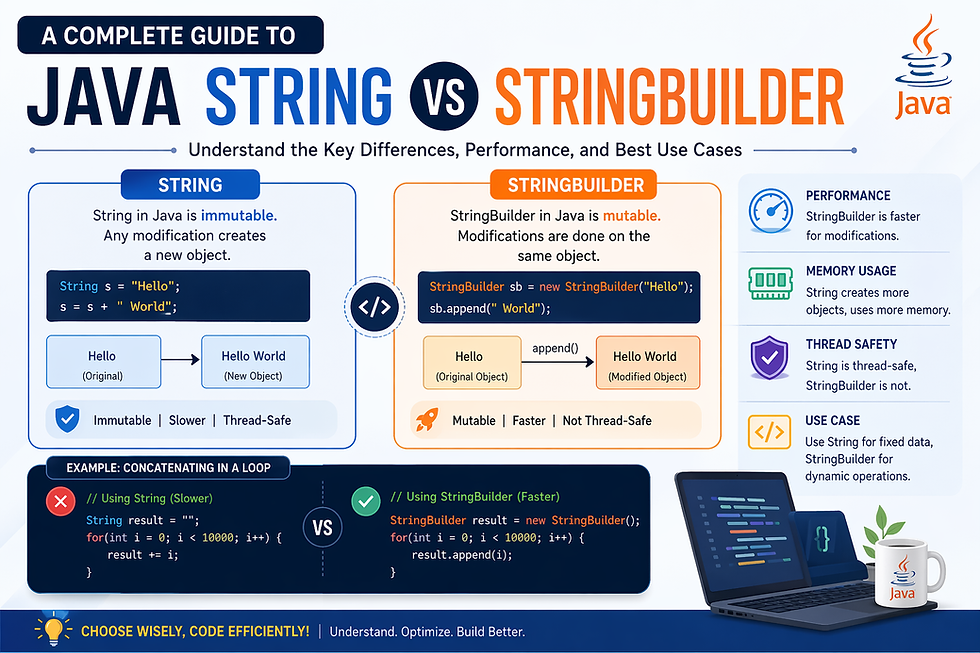
In Java programming, handling text efficiently is a fundamental skill. Two of the most commonly used classes for string manipulation are String and StringBuilder. Understanding the difference between Java String vs StringBuilder is crucial for writing optimized, high-performance applications.
A String in Java represents a sequence of characters and is widely used for storing text-based data such as names, messages, and file paths. On the other hand, StringBuilder is designed for scenarios where strings need to be modified frequently.
Why does this matter? Because choosing the wrong one can significantly impact your application’s performance, memory usage, and scalability. This guide will break down everything you need to know about String vs StringBuilder in Java.
Read More: What is StringBuilder in Java?
Overview of Java String Class
The String class in Java is one of the most important and frequently used classes in the language. It belongs to the java.lang package and is automatically imported into every Java program.
Key Characteristics of String
Strings are immutable
Stored in the String Constant Pool
Widely used for secure and fixed data
Immutability Explained
Once a String object is created, it cannot be changed. Any modification results in the creation of a new object.
String str = "Hello";
str = str + " World";
Here, a new String object "Hello World" is created instead of modifying the original.
Why Java Uses Immutable Strings
Security (used in file paths, URLs, etc.)
Thread safety
Caching and performance optimization
Overview of Java StringBuilder Class
The StringBuilder class in Java is used to create mutable (modifiable) strings. It is part of the java.lang package and was introduced to improve performance when handling dynamic string operations.
Key Features of StringBuilder
Strings are mutable
Faster than String for modifications
Not thread-safe (but more efficient)
Example Usage
StringBuilder sb = new StringBuilder("Hello");
sb.append(" World");
System.out.println(sb);
Unlike String, this does not create a new object. Instead, it modifies the existing one.
When to Use StringBuilder
When performing multiple string operations
Inside loops
When performance is critical
Key Differences Between String and StringBuilder
Understanding the core differences between String vs StringBuilder in Java helps developers choose the right tool.
Feature | String | StringBuilder |
Mutability | Immutable | Mutable |
Performance | Slower | Faster |
Memory Usage | Higher | Lower |
Thread Safety | Yes | No |
Use Case | Fixed text | Dynamic text |
Summary
Use String for static content
Use StringBuilder for dynamic operations
Immutability vs Mutability in Java
One of the most important concepts in understanding Java String vs StringBuilder is immutability vs mutability.
What is Immutability?
Immutability means the object cannot be changed after creation.
Example:
String str = "Java";
str.concat(" Programming");
The original string remains unchanged.
What is Mutability?
Mutable objects can be modified after creation.
Example:
StringBuilder sb = new StringBuilder("Java");
sb.append(" Programming");
The same object is updated.
Impact on Performance
Immutable objects create multiple instances
Mutable objects reuse the same memory
Advantages of Immutability
Thread-safe
Secure
Predictable behavior
Drawbacks
Higher memory consumption
Slower performance in loops
Performance Comparison: String vs StringBuilder
Performance is one of the biggest deciding factors when choosing between String and StringBuilder in Java.
String Performance Issue
String str = "";
for(int i = 0; i < 1000; i++) {
str += i;
}
This creates 1000 new objects, leading to:
High memory usage
Slower execution
StringBuilder Performance Advantage
StringBuilder sb = new StringBuilder();
for(int i = 0; i < 1000; i++) {
sb.append(i);
}
Only one object is modified, resulting in:
Faster execution
Better memory efficiency
Conclusion
String is inefficient for repeated modifications
StringBuilder is optimized for performance
String Concatenation in Java
String concatenation is one of the most common operations in Java.
Using + Operator
String result = "Hello" + " World";
Simple but inefficient in loops.
Using concat() Method
String result = "Hello".concat(" World");
Still creates a new object.
Problem with Multiple Concatenations
Every concatenation creates a new object, leading to:
Increased memory usage
Reduced performance
Best Practice
Use StringBuilder for multiple concatenations.
StringBuilder Methods and Usage
The StringBuilder class provides several powerful methods for string manipulation.
append()
Adds content to the end.
sb.append("Java");
insert()
Inserts content at a specific index.
sb.insert(0, "Hello ");
replace()
Replaces a portion of the string.
sb.replace(0, 5, "Hi");
delete()
Removes characters.
sb.delete(0, 2);
reverse()
Reverses the string.
sb.reverse();
Why These Methods Matter
They allow efficient string manipulation without creating new objects.
Memory Management in Java Strings
Memory management plays a crucial role in understanding String vs StringBuilder performance.
String Constant Pool
Java stores string literals in a special memory area called the String Pool.
String s1 = "Java";
String s2 = "Java";
Both refer to the same object in the pool.
Heap Memory
When using new, objects are stored in heap memory.
String s = new String("Java");
StringBuilder Memory Handling
StringBuilder objects are stored in heap memory and can grow dynamically.
Garbage Collection
Unused String objects are removed by Java’s garbage collector, but excessive creation can slow performance.
Thread Safety: String vs StringBuilder
Thread safety is another key factor in choosing between String and StringBuilder.
Is String Thread-Safe?
Yes. Because it is immutable, it is inherently thread-safe.
Is StringBuilder Thread-Safe?
No. It is not synchronized, which makes it:
Faster
But unsafe in multi-threaded environments
Alternative: StringBuffer
If thread safety is required, use StringBuffer, which is synchronized.
When to Use What
Use String → For constant data
Use StringBuilder → For performance in single-threaded apps
Use StringBuffer → For thread-safe operations
Practical Use Cases of String in Java
The String class in Java is ideal for scenarios where data remains constant and does not require modification.
Common Use Cases
Storing configuration values
Handling user input (read-only)
Managing URLs, file paths, and constants
Working with database queries
Why String is Preferred Here
Immutability ensures data integrity
Built-in security benefits
Safe for multi-threaded environments
Example
final String API_URL = "https://api.example.com";
Key Insight
Use String when your data is fixed and reusable, not frequently modified.
Practical Use Cases of StringBuilder
The StringBuilder class in Java is perfect for dynamic and frequently changing string operations.
Common Use Cases
Building large strings in loops
Generating dynamic HTML or JSON
Creating logs or reports
Processing text data in real-time
Example
StringBuilder report = new StringBuilder();
for(int i = 1; i <= 5; i++) {
report.append("Line ").append(i).append("\n");
}
Why StringBuilder is Better
Reduces memory overhead
Improves execution speed
Avoids unnecessary object creation
Key Insight
Use StringBuilder when performance and efficiency are critical.
String vs StringBuilder vs StringBuffer
When comparing String vs StringBuilder vs StringBuffer, each serves a specific purpose.
Feature | String | StringBuilder | StringBuffer |
Mutability | Immutable | Mutable | Mutable |
Thread Safety | Yes | No | Yes |
Performance | Slow | Fast | Moderate |
Use Case | Static data | Dynamic (single-thread) | Dynamic (multi-thread) |
When to Choose What
String → Fixed content
StringBuilder → Fast, non-threaded operations
StringBuffer → Thread-safe operations
Pro Tip
Avoid StringBuffer unless thread safety is required—it adds unnecessary overhead.
Common Mistakes Developers Make
Even experienced developers often misuse String and StringBuilder.
Top Mistakes
Using String inside loops
Ignoring performance impact
Overusing StringBuilder for small operations
Not understanding immutability
Choosing StringBuffer unnecessarily
Example of a Mistake
String result = "";
for(int i = 0; i < 1000; i++) {
result += i; // inefficient
}
Correct Approach
StringBuilder result = new StringBuilder();
for(int i = 0; i < 1000; i++) {
result.append(i);
}
Key Insight
Small inefficiencies can become major performance issues at scale.
Best Practices for Using Strings in Java
Optimizing string usage is essential for writing high-performance Java applications.
Best Practices
Use String for constants and fixed values
Use StringBuilder for loops and dynamic content
Avoid unnecessary string concatenation
Prefer StringBuilder over StringBuffer unless needed
Initialize StringBuilder with capacity when possible
Example
StringBuilder sb = new StringBuilder(100);
Why This Matters
Pre-allocating memory reduces resizing operations and improves performance.
Code Examples: String vs StringBuilder
Let’s compare both with a simple example.
Using String
String str = "Java";
str = str + " Programming";
System.out.println(str);
Using StringBuilder
StringBuilder sb = new StringBuilder("Java");
sb.append(" Programming");
System.out.println(sb);
Loop Comparison
// String (slow)
String s = "";
for(int i = 0; i < 10000; i++) {
s += i;
}
// StringBuilder (fast)
StringBuilder sb = new StringBuilder();
for(int i = 0; i < 10000; i++) {
sb.append(i);
}
Result
StringBuilder significantly outperforms String in loops.
Interview Questions on String vs StringBuilder
Preparing for interviews? These questions are frequently asked.
Top Questions
What is the difference between String and StringBuilder?
Why are Strings immutable in Java?
Which is faster: String or StringBuilder?
When should you use StringBuilder over String?
What is the difference between StringBuilder and String Buffer?
Sample Answer Tip
Focus on:
Mutability
Performance
Thread safety
Pro Tip
Always include real-world examples when answering.
Real-World Performance Benchmark
Let’s look at a simplified benchmark comparison.
Scenario
Appending 10,000 numbers
Method | Time Taken |
String | High |
StringBuilder | Low |
Analysis
String creates thousands of objects
StringBuilder modifies a single object
Practical Insight
In high-performance applications like:
Data processing
Logging systems
Web applications
Using StringBuilder can significantly improve efficiency.
Summary of Key Differences
Here’s a quick recap of Java String vs StringBuilder:
String is immutable → Safe but slower
StringBuilder is mutable → Fast but not thread-safe
String uses more memory in loops
StringBuilder is ideal for dynamic operations
Quick Decision Guide
Static content → Use String
Frequent updates → Use StringBuilder
Multi-threading → Use String Buffer
Read More: Java String vs StringBuilder
Conclusion:
Choosing between String and StringBuilder in Java depends on your specific use case.
Final Recommendation
Use String for:
Constants
Read-only data
Thread-safe operations
Use StringBuilder for:
Dynamic string manipulation
Loop operations
Performance-critical applications
Golden Rule
If your string changes frequently, StringBuilder is the better choice.
Final Thoughts:
Understanding the difference between Java String vs StringBuilder is not just a theoretical concept—it directly impacts your application’s performance and scalability.
By applying the best practices and insights from this guide, you can:
Write cleaner code
Improve execution speed
Optimize memory usage


Comments